An offline photo editor for Android, built into a gallery that can't go online
Simplify my Gallery now has a full offline photo editor for Android: film presets, curves, light leaks, date stamps and text, with no ads, account or upload.
You took a photo of a sunset from a train window. It came out flat and grey. You want it warmer, with a little grain and the date in orange in the corner, like the photos in a shoebox at your parents’ house. Most apps that do this want an account, an internet connection, or a subscription. Some of them want all three. Many show an advert before they let you save.
Simplify my Gallery now has an offline photo editor for Android. It is built into the gallery, and it does presets, tone curves, colour mixing, light leaks, dust, a date stamp, markup and text. It is still free, still has no ads, and still does not have the internet permission. Every filter is worked out on your phone, because the app has no way to send your photo anywhere else.
Get Simplify my Gallery on Google Play
Why put a real editor in a gallery app?
When Gallery launched, editing meant crop and rotate. That covers a crooked horizon. It does not help with a dull photo.
The usual answer is “install an editor”. But editor apps are where the catches tend to be. Filter packs get downloaded from a server. Some effects sit behind a Pro tier. Some edits only run in the cloud. And every one of them is another app asking to read your whole photo library.
I wanted the editor to follow the same rule as the rest of the app. It opens from the photo you are looking at, it runs on the phone, and when you are done it is gone.
Presets and film looks, applied offline

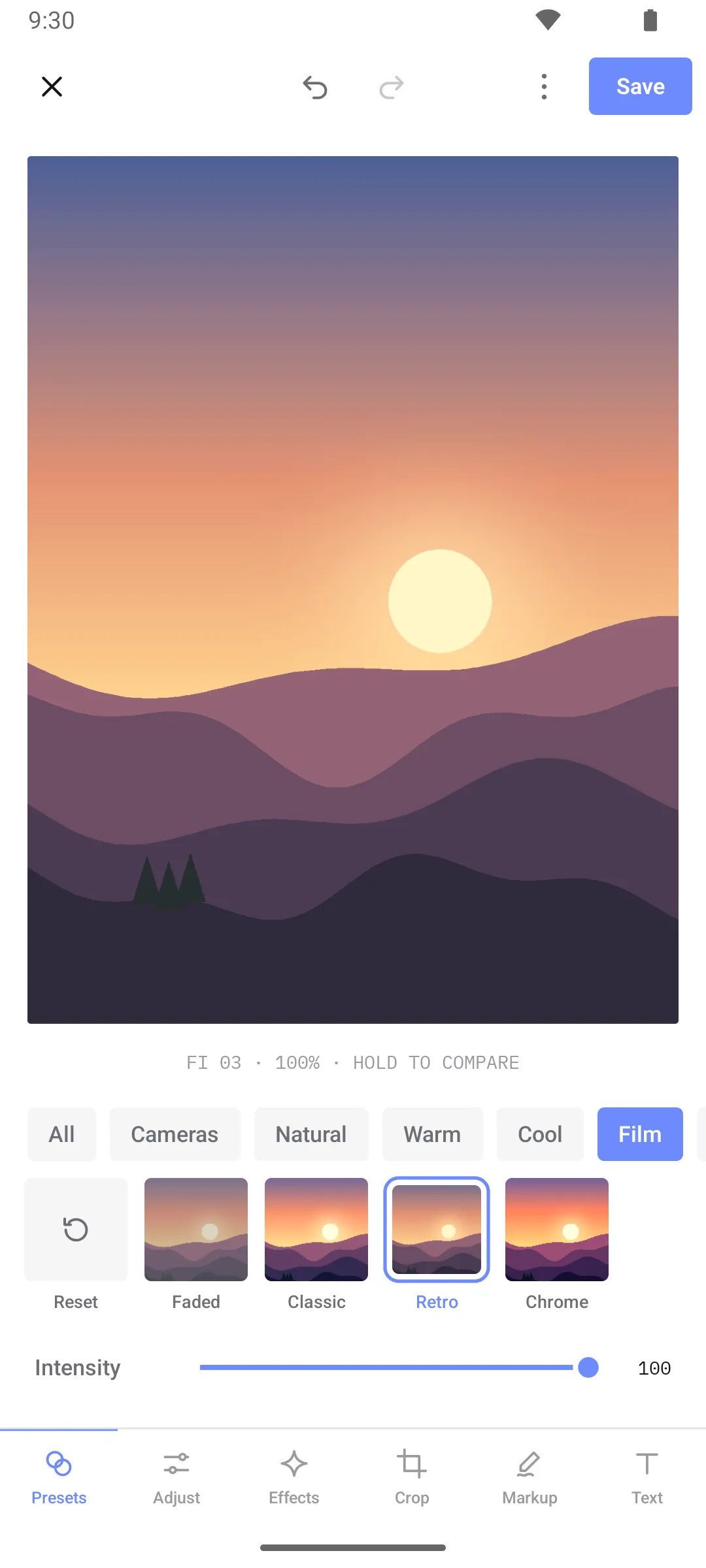
The Presets tab is the quick path. Tap a look, and drag Intensity down if it is too much.
- 20 presets in five packs: Natural, Warm, Cool, Film and Mono. Each preset has a short code under the photo, like
FI 03for Retro, so you can find the same look again next time. - Five camera looks: Digital, Pocket, Zoom, Instant and Camcorder. Each one copies the feel of a type of camera, and you can change its film stock, strength, glare, grain and fade.
- Thumbnails of your own photo, not a stock picture, so you see what each preset does before you pick it.
- Hold to compare. Press and hold the photo to see the original. Let go to see the edit again.
Presets are built from the same sliders as the Adjust tab, so nothing is hidden. If you like Golden but want it less orange, you can apply it and then move the temperature back.
Fine control: sliders, curves and colour mix
The Adjust tab has 17 sliders: exposure, brightness, contrast, highlights, shadows, whites, blacks, saturation, vibrance, temperature, tint, fade, clarity, sharpen, glow, grain and vignette.

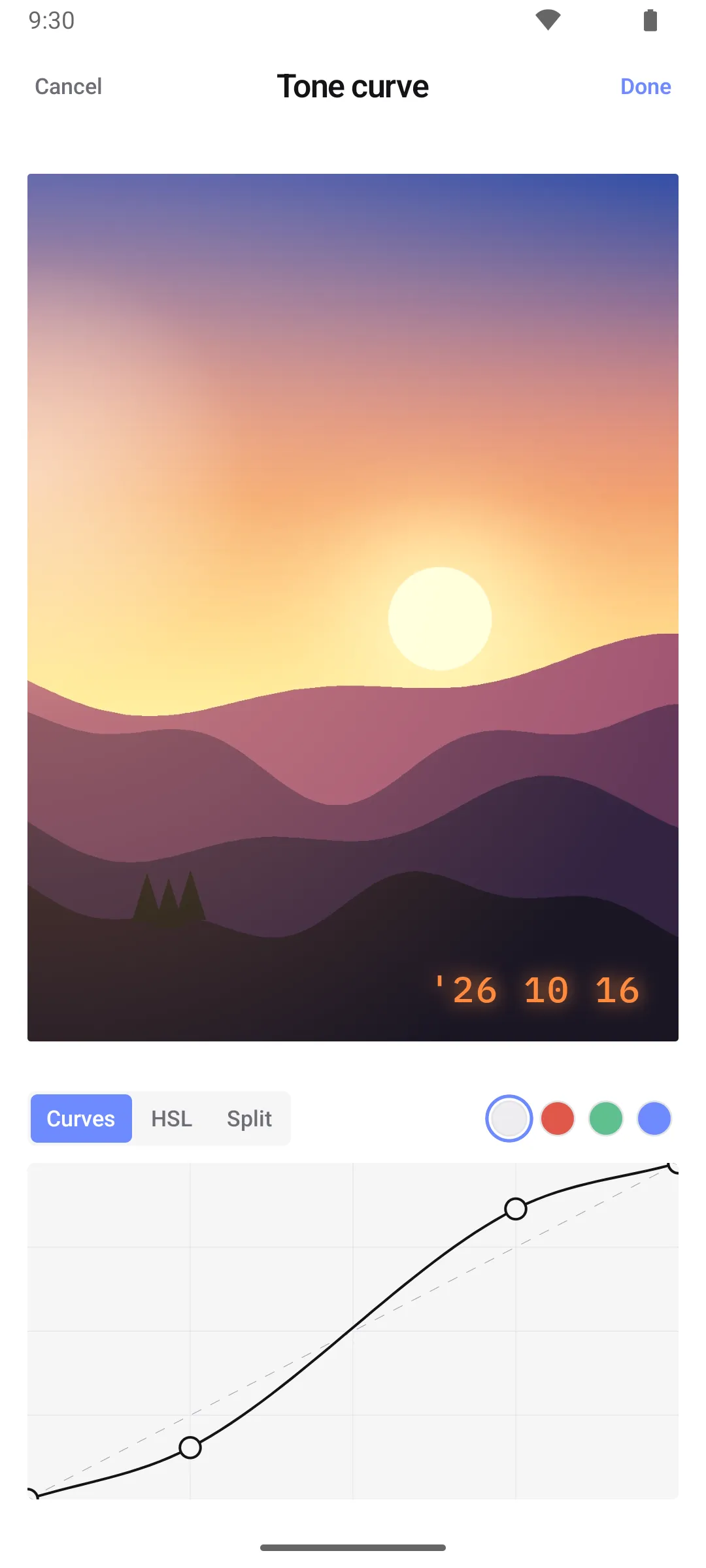
At the end of that row are three tools you usually only find in desktop editors:
- Tone curve for the whole image or for red, green and blue separately. Tap the line to add a point and drag it. A gentle S-curve, like the one above, is the classic way to add contrast without crushing the shadows.
- Colour mix (HSL) across eight colour bands, from red to magenta. Make the sky bluer without turning faces blue, or turn down one loud green.
- Split tone, which tints highlights and shadows with two different colours. This is where the warm-highlight, cool-shadow film look comes from.
Every change goes into a history of up to 50 steps, with undo and redo at the top of the screen.
Light leaks, dust and a date stamp

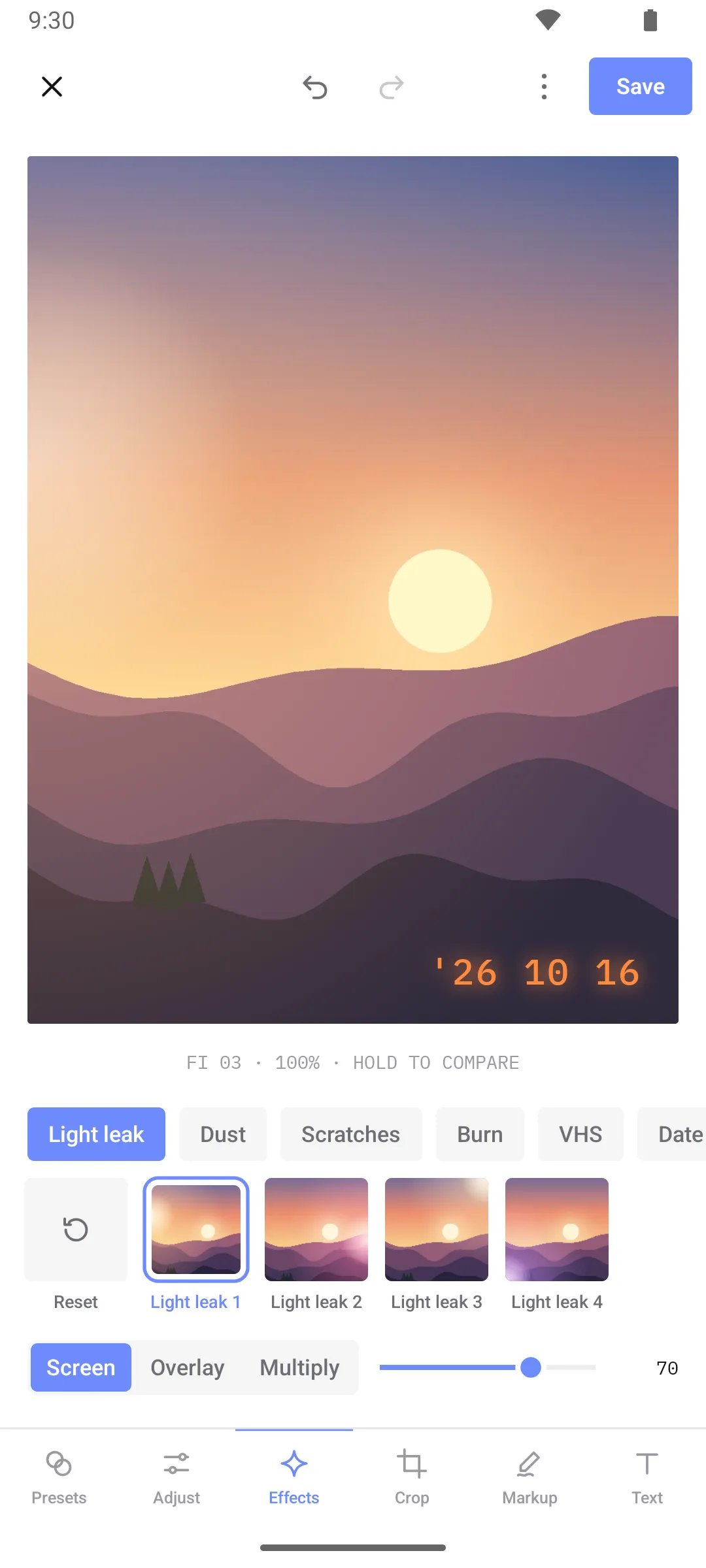
The Effects tab is the fun part. It adds the flaws that old film cameras had:
- Light leak, Dust, Scratches, Burn and VHS, each with four variants.
- Blend mode and opacity for every effect: Screen, Overlay or Multiply, so you can make a leak soft and warm or harsh and bright.
- Date stamp in four styles: Classic orange, LED red, White and Ink. It uses the date the photo was taken, not today’s date, unless the file doesn’t record one.
None of these effects are downloaded. They are drawn by the app on the phone, at the size of your photo. Gallery could not download them even if I wanted it to.
Every filter, curve and light leak is worked out on your phone. The app has no internet permission, so there is nowhere else it could happen.
Crop, markup and text
The rest of the editor covers the jobs you need a few times a week:
- Crop with free, original and fixed ratios (1:1, 4:5, 4:3, 3:2, 16:9, 9:16), rotate and flip. Straighten goes up to 45 degrees either way, and Perspective fixes a document or a building shot from an angle.
- Markup: pen, pencil, marker, highlighter, line, arrow, rectangle, ellipse and eraser, with six colours and four widths. Useful for circling the right parking spot or crossing out an account number on a screenshot before you send it.
- Text in four fonts, with alignment, an optional background plate, rotation and a lock so you don’t move it by accident.
Your original photo is never overwritten
When you tap Save, Gallery writes a new copy next to the original, in the same folder, with _edited_ in the file name. The original stays exactly as it was. If you don’t like the result next week, the photo you started with is still there.
Gallery now speaks six languages

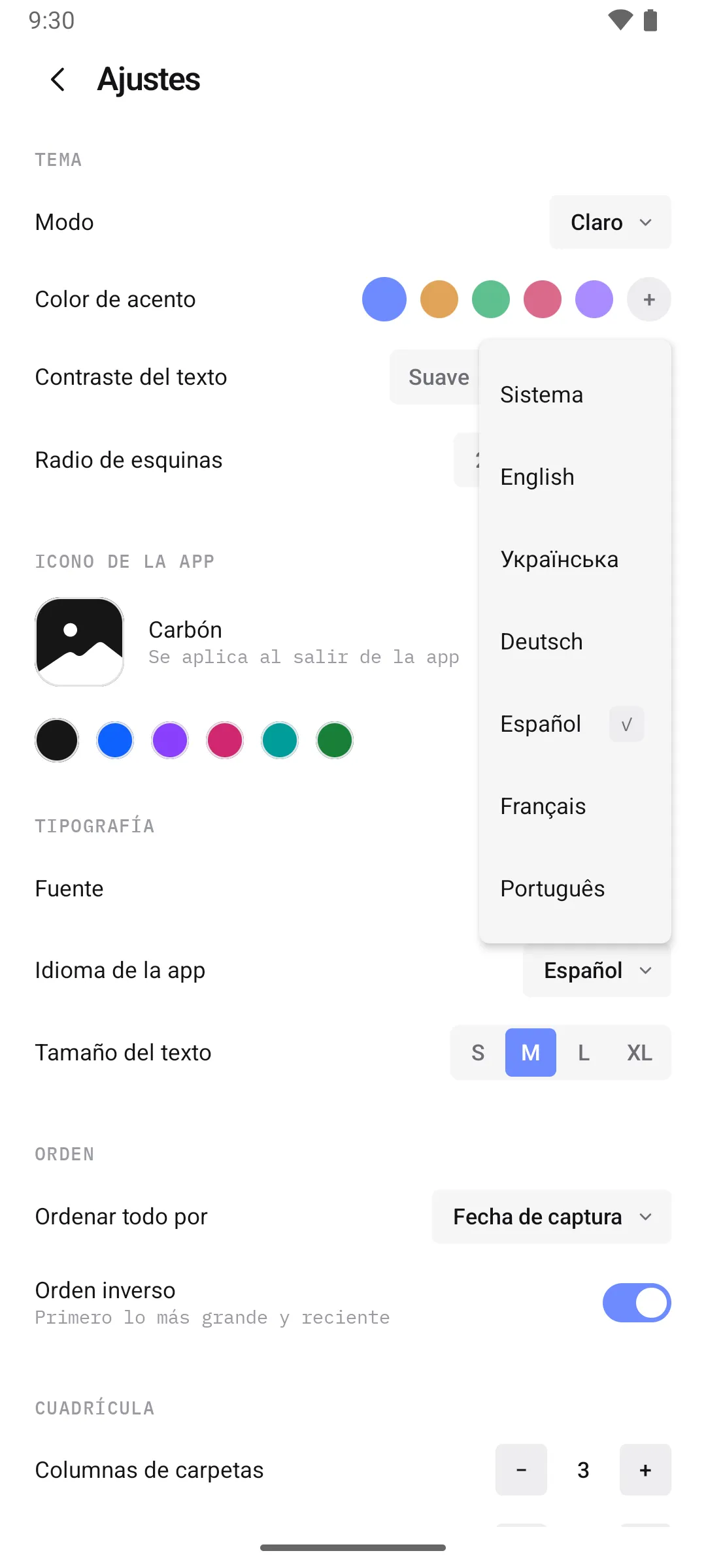
The same update adds German, Spanish, French and Portuguese, alongside English and Ukrainian. Gallery follows your phone’s language by default. You can also pick a language just for Gallery in Settings → App language, without changing the rest of your phone. Language names are always shown in their own language, so you can find yours even if the app is set to one you don’t read.
If your language is missing, or a translation sounds wrong, tell me.
How it compares to other photo editor apps
| Simplify my Gallery editor | Cloud and AI editors | Ad-supported filter apps | |
|---|---|---|---|
| Price | Free, every tool | Often a subscription for the best tools | Free, Pro tier to remove ads or watermarks |
| Ads | None | Usually none | Banners and full-screen ads |
| Account | No | Often required | Sometimes |
| Works offline | Always | Partly; some tools need a server | Filter packs are often downloaded |
| Internet permission | Not requested | Required | Required |
| Original photo | Kept, edit saved as a copy | Varies | Varies |
To be fair: if you need AI object removal, a healing brush or layers, a dedicated editor is the right tool and this is not trying to replace it. This editor is for the edits most people make most days: a better colour, a straighter horizon, a film look, a note on a screenshot. Without leaving the gallery, and without anything leaving your phone.
Who it is for
- Anyone looking for a photo editor with no ads that doesn’t ask for an account.
- People who like film filters, light leaks and date stamps but don’t want a separate app for them.
- Anyone who edits screenshots before sharing them and would rather the screenshot never touch a server.
- People who want their phone in German, Spanish, French or Portuguese, and their gallery to match.
Frequently asked questions
Does the photo editor work without internet?
Yes, always. Gallery does not have the internet permission, so every preset, curve and effect is worked out on the phone. Flight mode makes no difference.
Will editing overwrite my original photo?
No. Saving creates a new copy in the same folder, with _edited_ in the file name. The original file is not changed.
Are the filters and effects free?
Yes. All presets, camera looks, effects and tools are included. There is no Pro version, no in-app purchase and no watermark.
Can I undo an edit?
Yes. Undo and redo are at the top of the editor and keep up to 50 steps. You can also press and hold the photo to compare it with the original.
How do I change the language of Simplify my Gallery?
Open the menu, go to Settings, and pick a language under App language. Choose System to follow your phone’s language again.
The editor and the new languages are part of the latest Gallery update. Open a photo, tap edit, and try the Film pack.